
This post explains what each layer does, what each one misses, how to combine them, and how to size the spend. It is written for localization managers, content and loc buyers, and PMs evaluating their translation-QA stack. We assume you already manage a Crowdin, Lokalise, Phrase, or Smartcat pipeline and have heard the words LQA, LQT, and proofreading used in three different ways inside the same meeting.
LQA scoring uses a defined framework. The industry standard is MQM (Multidimensional Quality Metrics), and the output is an objective report rather than a verdict.
1. The terminology trap: LQA, LQT, proofreading, editing
Talk to three localization vendors this quarter and you will probably hear four definitions of the same thing. Before going further, here is how we will use the words in this post.
Proofreading. The final language pass on translated text inside a translation platform (Crowdin, Lokalise, Phrase, Smartcat, and so on). It catches typos, grammar, punctuation, capitalization, and stylistic issues. It is often performed without reference to the source text. The reviewer sees the target language only: clean, but blind to whether the meaning matches.
Editing. A more thorough pass that includes the source text alongside the translation. It checks accuracy, terminology, register, and overall fidelity. The line between proofreading and editing varies by vendor. Some bundle them; some bill separately; definitions drift. When in doubt, ask the vendor what their proofreading and editing service actually includes.
LQA, or Linguistic Quality Assurance. The umbrella term for ensuring the localized product meets quality standards in every language. It is performed in context, on a build, on a staging environment, or on a live product. It uses a defined severity rubric and produces a report where each issue is tagged with location, severity, and a proposed fix.
LQT, or Linguistic Quality Testing. In strict usage, LQT is the in-product testing step inside the broader LQA process. In practice, vendors and localization managers use "LQA" and "LQT" interchangeably, and most service catalogs treat them as synonyms. We will use LQA as the primary term in this post and call out LQT wherever the in-build testing aspect specifically matters.
The clean mental model:
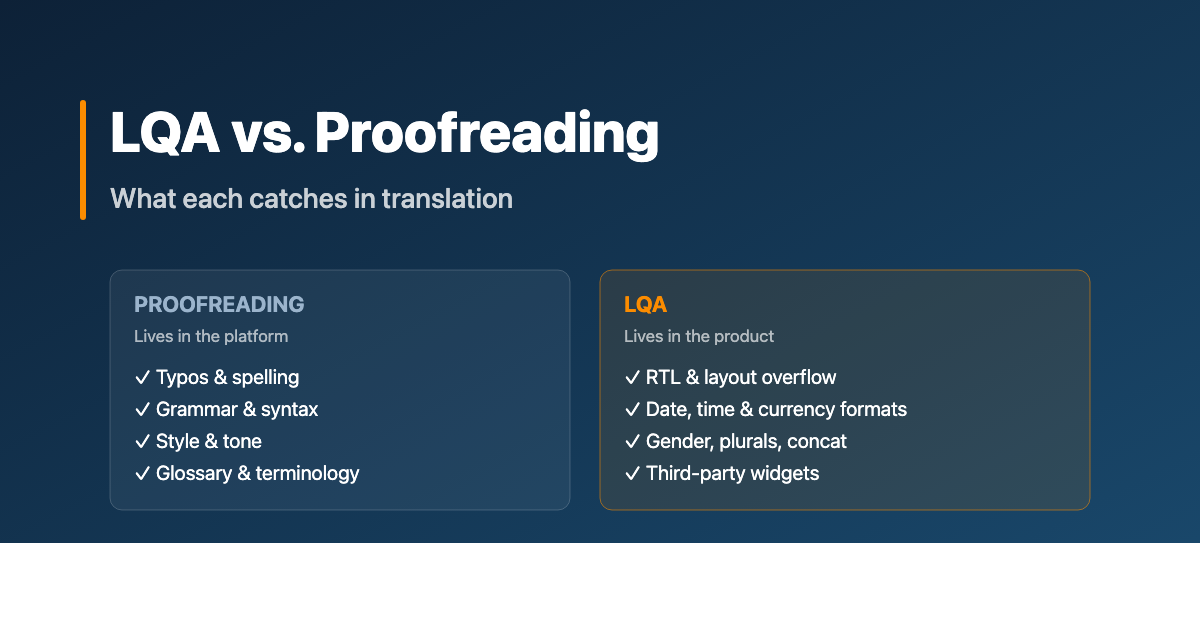
Proofreading lives in the platform.
Editing lives in the platform with the source.
LQA / LQT lives in the product.
If you take only one thing from this post: those are different physical locations, and that is why they catch different errors.
2. Proofreading: what it actually does
A proofreading pass typically happens after the translator has delivered the target language file back into the translation platform. A second native speaker, the proofreader, opens the same file and goes segment by segment, line by line.
What they have access to:
- The target language text (always)
- The source text (only if the workflow defines this; many proofreading SOWs explicitly do not include source comparison, which is editing)
- The project glossary
- The style guide
- Translation memory matches and concordance
- Comments and queries from the translator
What they are looking for:
- Typos and misspellings
- Grammar and syntax errors
- Punctuation, capitalization, formatting (within the segment)
- Tone and register inconsistencies
- Glossary deviations (when the platform highlights them)
- Spelling of proper nouns, brand terms, product names
The pros of proofreading
Proofreading is fast and structured. Segment-by-segment review on a clean platform, with the linguistic assets right there. A proofreader can move through thousands of words a day.
It is cheap relative to what it catches. Per-word pricing, well-understood scope, easy to procure.
It leverages your language assets. Glossary, style guide, and translation memory all live in the platform and surface during the review. Proofreading is the moment those assets earn their keep.
It scales. Once a vendor knows your style guide and glossary, proofreading throughput scales with translator availability.
The cons of proofreading
Proofreading is blind to context. The reviewer sees a string in a list of strings. They do not see whether "Edit" will appear next to a pencil icon, or whether "Settings" will be a screen title or a button. That changes everything about the right translation.
It is blind to length. The platform does not show that the German for "Save changes" is 35 percent longer than the English, and that the button it goes into is fixed-width.
It is blind to layout, format, and locale. Date formats, currency placement, decimal separators, RTL flow, hyphenation rules: none of that is visible in a segment view. A proofreader can read perfect Arabic copy and miss that the entire screen flows the wrong way.
It is blind to dependencies. If string ID 4521 says "Welcome," and string ID 4522 (which appears beneath it on the welcome screen) introduces the user to a feature, the proofreader has no way to know the two strings need to flow as a paragraph in the target language. Concatenation issues are invisible.
Proofreading polishes the words. It does not see the screen.
For long-form static content like blog posts, knowledge-base articles, email templates, and marketing copy, proofreading is often enough. The unit of meaning is the paragraph, not the screen, and the platform view is a faithful representation of how the reader will encounter the text.
For anything that lives inside a product UI, it is not.
3. Editing: the in-between
Editing is usually defined as a with-source review pass. The reviewer reads the source segment, reads the translation, and assesses meaning, accuracy, and faithful register.
In a properly tiered workflow this looks like translator → editor → proofreader. In practice, especially with smaller volumes or budget pressure, the steps collapse. Editing and proofreading get bundled into a single second-language pass that some vendors call "review," others call "TEP" (Translation, Editing, Proofreading), and others just call "translation with QA."
The takeaway for buyers: the word "proofreading" alone may or may not include source comparison; ask before signing the SOW. Either way, neither editing nor proofreading sees the localized product. That is the gap LQA fills.
4. LQA: what it actually does
An LQA pass happens after the translated content has been built into the product: a mobile app build (.apk, TestFlight), a deployed staging environment, a published webpage, a game build, a video with subtitles burned in. The reviewer's environment is no longer the translation platform; it is the product itself, in the target language, on a target-region device or browser.
A native-speaker linguist runs through key user flows and screens, flagging anything that is wrong, awkward, or unsafe. They use the same translation platform as a fix-routing tool, but the issues are found against the live product.
What an LQA reviewer has access to:
- The localized product, fully built and runnable
- The original translated strings (via the platform)
- The user flows and screens where each string actually appears
- Locale-specific device settings, currencies, date formats
- The full visual context: layout, fonts, icons, surrounding copy
- Where applicable: test scenarios, defined critical paths, severity criteria
What they are looking for is a longer list than proofreading. We will spend the next section on it because that is where the value lives.
The pros of LQA
LQA catches what proofreading cannot.
It is objective and scorable. Findings are tagged with severity (Critical / Major / Minor / Preferential) using a defined rubric, so quality becomes a number you can track over time and across languages.
It plugs in. A third-party vendor can perform LQA on top of any existing translation pipeline, without re-onboarding translators or rebuilding glossary infrastructure. The vendor needs build access and the source files.
It surfaces upstream issues. A pattern of similar errors across multiple locales reveals problems in the source code (hard-coded strings, layout assumptions, missing internationalization) that no amount of translator-side work can fix.
The cons of LQA
LQA needs a build. Mobile teams need to provide an APK or a TestFlight build; web teams need a staging environment with locale switchers wired up; game teams need either a build or, ideally, a developer console with cheats to navigate quickly. If your build process is not ready, LQA cannot start.
It is slower per word. A linguist navigates through screens and flows, not through a list of strings. A typical mobile-app LQA pass might cover thousands of strings, but the reviewer hits each one in context, not at platform throughput.
It needs scenarios. To run efficiently, an LQA team needs at least a rough idea of which screens, flows, and strings matter most. Otherwise reviewers spend time on settings menus instead of checkout.
These costs are real. They buy a class of finding that platform-level review cannot produce, no matter how good the proofreader.
5. The errors LQA catches that proofreading cannot
Each of the issues below was invisible at the translation-platform level. Each one only surfaced when a native-speaker linguist saw the localized product on a target device.
Right-to-left orientation (Arabic, Hebrew, Farsi, Urdu)
A perfectly translated Arabic paragraph means nothing if the navigation flows left to right, the chat-bubble icons point the wrong direction, and the back button still sits on the left. RTL is an internationalization concern that lives in code, not in translation memory. The proofreader sees clean Arabic in the platform; the LQA reviewer sees the screen flowing wrong. Mirroring affects layout direction, icon orientation, animation direction, scrollbar placement, and even the order of paginated lists. None of that is visible to a segment-level review.
Date, time, and currency formatting
In French, the currency symbol comes after the amount: "0,19 USD/min" rather than "USD 0.19/min." In Japanese, dates use the character 月 for month, so "June" written as "6" without the suffix becomes nonsense. In German, decimal separators are commas; in English, periods. None of this can be checked at the segment level. The translator is given a string template and the locale-aware formatting is the runtime's job. But the runtime is often configured wrong, or the translator gets a literal 0.19 USD string and cannot fix the locale logic from inside the platform.
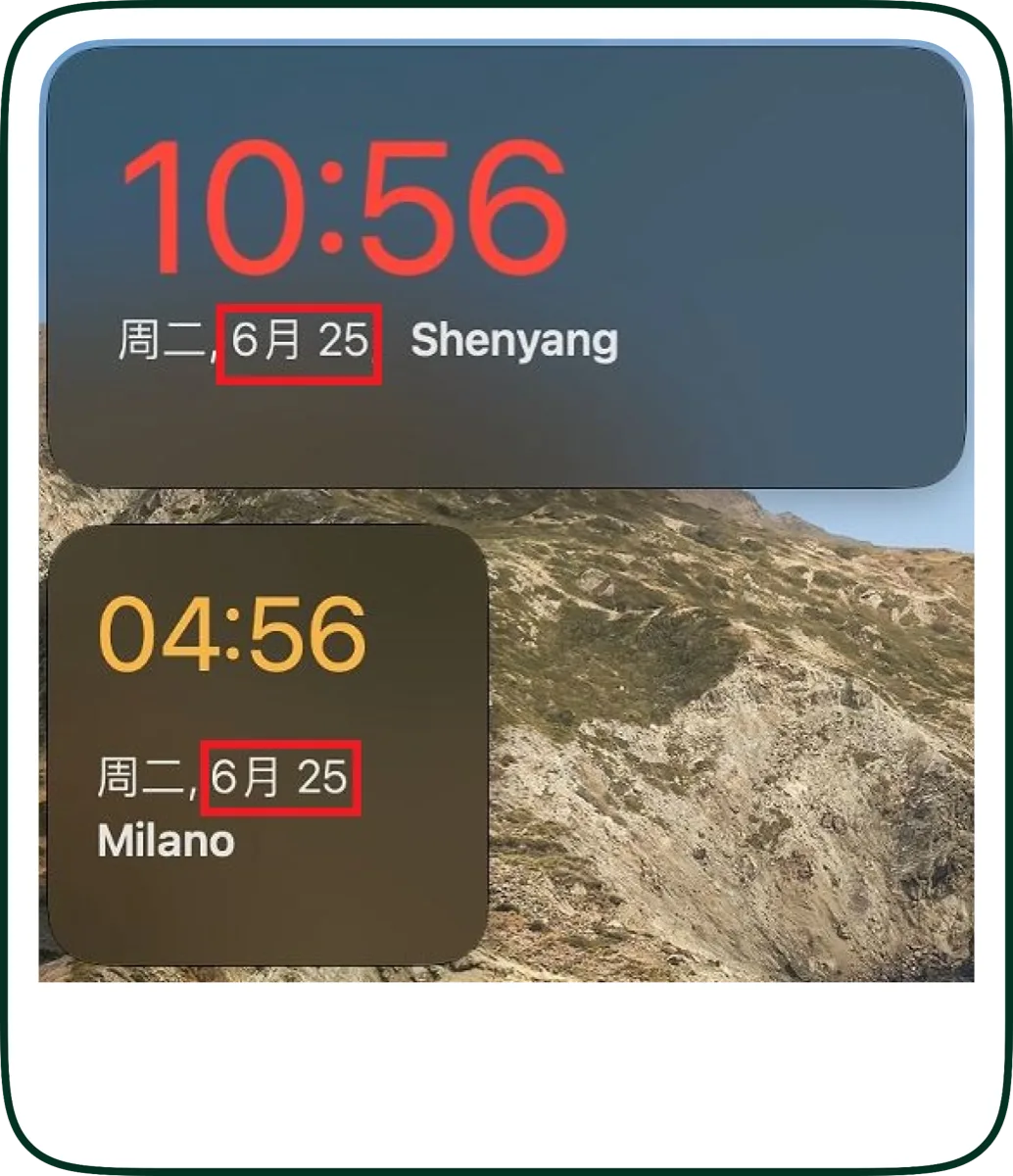
Text expansion and overflow
Spanish, French, and German translations run 25 to 30 percent longer than English. A button labeled "Save" in English becomes "Sauvegarder" in French, "Speichern" in German, and "Guardar" in Spanish. If the button is fixed-width or nested inside a tight grid, the translation gets truncated, ellipsized, or wraps in ways that destroy the UX. The proofreader sees the correct word; the LQA reviewer sees it cut off.
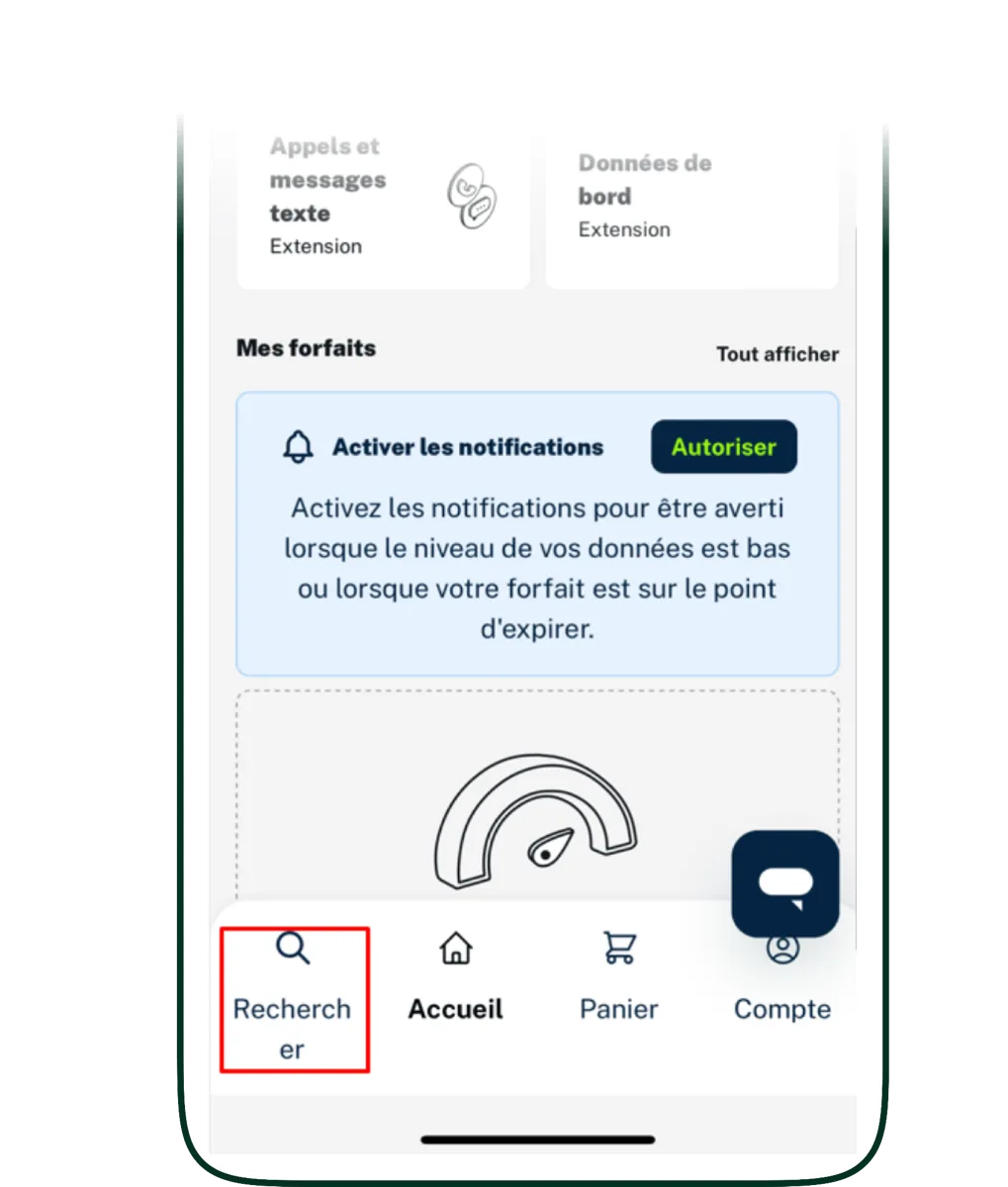
Hard-coded layout assumptions
Code that adds spaces, line breaks, or punctuation in the host language frequently breaks in translation. French requires a non-breaking space before a colon: "Erreur : ..." rather than "Erreur: ...". If that space is hard-coded into the English source and not into the translation, every French string gets it wrong. It is a punctuation error visible to a French reader, invisible to an English-speaking developer.
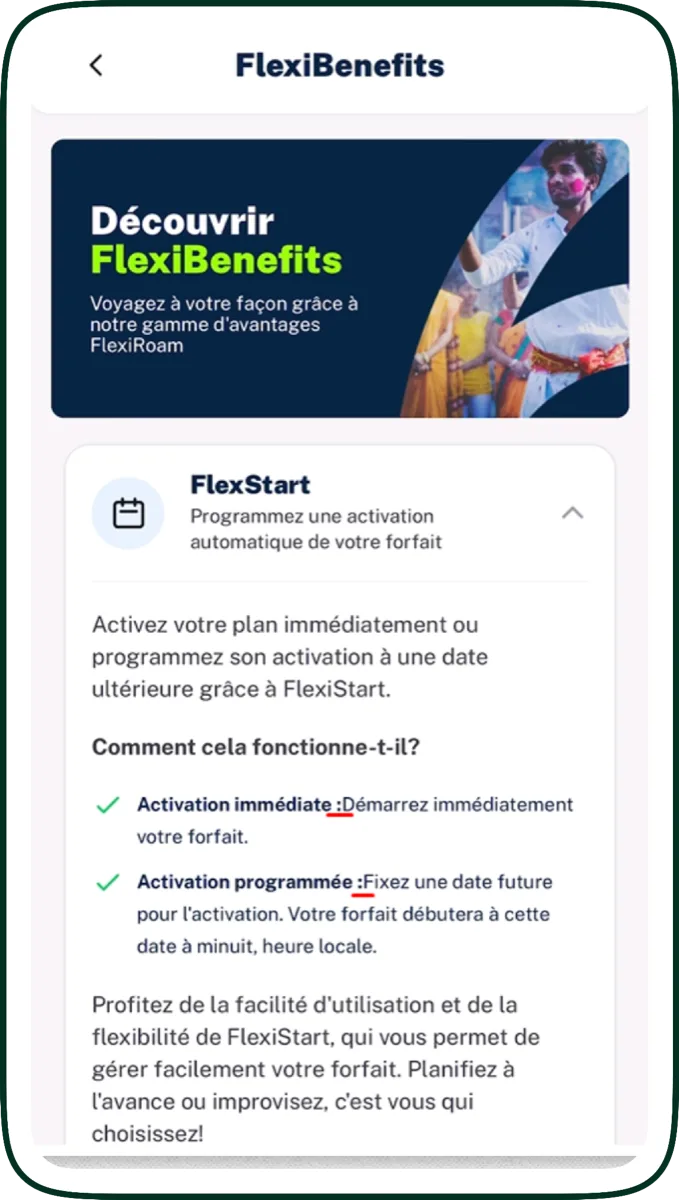
Capitalization and string concatenation
Many products break long sentences into multiple strings ("You have ", count, " new messages") to allow runtime substitution. In languages with grammatical gender, declension, or different word order, this falls apart. A literal Russian translation of "You have count new messages" reads as broken Russian because the verb form depends on the count. Proofreaders see strings; LQA reviewers see the full sentence assembled.
![German fertility-tracking app screen with the highlighted string '[LH-Anstieg]' showing a string-concatenation issue](/images/blog/lqa-vs-proofreading/lqa-german-string-concatenation.webp)
Context-dependent gender and verb form
The English word "Finished" maps to "Terminé" (masculine) or "Terminée" (feminine) in French depending on what is finished. Without seeing the surrounding screen, the translator and proofreader have to guess. Inside the build, the LQA reviewer sees that "Finished" labels a thumbnail of a photo (image, feminine in French) and corrects the form. A proofreading pass would never have caught this.
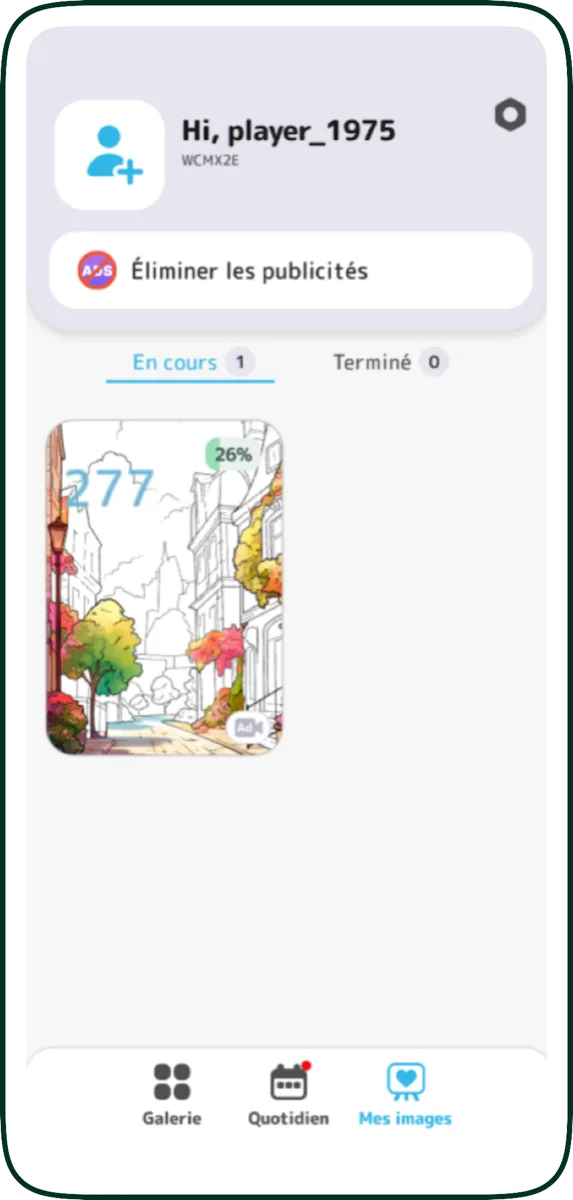
Verb tenses behave the same way. A Chinese reviewer flagging that an instruction was localized as a question rather than an imperative only catches that with full screen context.
Third-party module localization
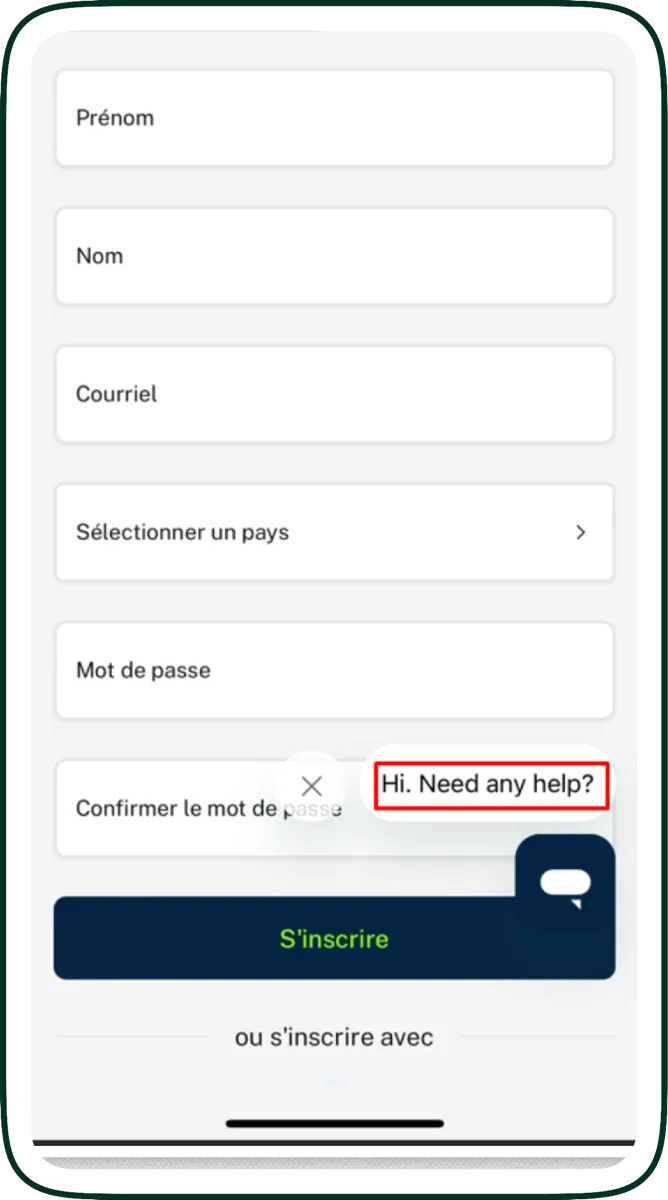
Third-party UI components like chat widgets, payment forms, and analytics consent banners often render their own translations from their own translation files. They are frequently overlooked when localization scopes are defined, so they ship with English copy in an otherwise localized product. Only an LQA pass on the running app reveals it.
Cultural appropriateness in context
A color, an image, a name, an idiom, a date that means something charged in the target market: these surface only when the product is seen as a whole. A proofreader reading the welcome screen copy cannot tell that the welcome screen image is a culturally inappropriate gesture in Japan. (For deeper cultural-fit work specifically, see our cultural analysis service, which complements LQA on launch-critical content.)
A proofreading pass cannot find any of the above. An LQA pass routinely finds all of them. That is why LQA is a distinct service.
Each of these findings goes into a structured report tagged with an MQM error category and a severity level. That is what turns LQA from opinion into a number you can track.
6. Scoring it: MQM and the severity rubric
LQA without a scoring framework is just opinion. The industry standard is MQM (Multidimensional Quality Metrics), a structured way to categorize translation errors so quality becomes a number you can track over time and across languages. Each finding gets two tags: an error category (terminology, accuracy, fluency, style, locale convention, design, internationalization, and so on) and a severity level. Together they produce a per-locale score that holds up under scrutiny.
The severity column does the most work in a triage meeting. Five buckets cover the cases that show up in practice:
- Critical. User-facing errors with legal, safety, or branding implications, or anything that crashes or breaks the product.
- Major. Accuracy errors that change meaning, button labels that misrepresent function, gross grammar in core UI.
- Minor. Punctuation, formatting, or style issues that do not lose meaning.
- Preferential. A different translation that is also correct. Logged for transparency, not counted against quality.
- Blocker. Something that prevents further testing. For example, the app crashing when a locale is set, blocking review of subsequent screens.
A defensible LQA process produces numbers, not narratives. If your vendor delivers an LQA report that reads as a list of opinions without severity tags or category mapping, you do not have an LQA process. You have an expensive proofreading pass with extra steps.
If you want to see what an MQM-tagged report actually looks like before commissioning one, Alconost runs a free MQM annotation tool at alconost.mt: no registration, 16 MQM error categories, three severity levels, 120+ languages. Run a sample through it and the format speaks for itself.
7. What an actual LQA report looks like
A production LQA report is a structured deliverable, not an email with screenshots. The shape that works:
| Field | What it contains |
|---|---|
| Location | Where the issue was found: a link, a screen reference, or a screenshot |
| Severity | Critical / Major / Minor / Preferential / Blocker |
| Issue description | One- or two-sentence explanation of the problem, plus a screenshot |
| Existing translation | The current target-language string |
| Proposed translation | Recommended fix |
| Comment | Reviewer's reasoning, additional context, or queries |
| Fixed in [platform] | Boolean: has the fix been applied to source? |
Each row is one finding. A typical mobile-app LQA pass produces between 40 and 200 findings per language; web apps and enterprise SaaS often produce more. The report goes to the localization manager, who routes fixes to translators (in the platform) or to engineers (for code-level issues like layout, RTL handling, or third-party scope).
Over time, the severity tags reveal patterns: one engine consistently fails on terminology in Japanese, one translator's German has fluency issues, one screen accumulates findings every release because it has hard-coded English strings. That diagnostic value is hard to replicate any other way.
The dimension-and-severity tags align with MQM, so reports are interoperable with any MQM-based quality program your team already runs.
8. Outsourcing dynamics: LQA plugs in, proofreading needs onboarding
One reason LQA is so widely outsourced, even by teams with in-house translators, is that it is vendor-agnostic. Three implications follow.
LQA can sit on top of any existing pipeline. Whether your translation is done in-house, by a single agency, by a roster of freelancers, or via AI with light machine translation post-editing, LQA runs on the output (the build), not on the workflow upstream. You do not need to re-onboard your translators, expose your TMs, or change your platform.
Onboarding is light. An LQA vendor needs build access (APK / TestFlight / staging URL), a list of locales in scope, and ideally a rough scenario list (key screens, conversion flows, regulated content). They can be productive within days rather than weeks.
Proofreading is the opposite. Effective proofreading needs the vendor to know your style guide, your glossary, your terminology, and your brand voice. That knowledge takes time to build and is sticky. Switching proofreading vendors mid-project is painful. LQA findings are objective enough that switching LQA vendors is mostly an exercise in standardizing the report format.
This is why most mature programs run proofreading with a small, deeply trained set of preferred linguists, and run LQA with a separate vendor (or as periodic third-party audits). The two pull different levers and have different switching costs.
9. The hybrid pattern: when to use what
The wrong question is "LQA or proofreading?" The right question is "what mix?"
A pragmatic pattern:
- Long-form static content (blog, knowledge base, marketing emails, legal copy that does not render in a UI): proofreading is the primary review layer. The unit of meaning is the paragraph, the platform view is faithful, and LQA adds little.
- Business-critical UI flows (sign-up, checkout, payment, onboarding, cancellation, data deletion, regulated disclosures): LQA is mandatory. These are the flows where errors translate directly to lost conversions, support tickets, or regulatory exposure. Proofreading alone is not enough.
- Standard UI (settings, profile, peripheral flows): LQA on a sample, typically 20 to 40 percent of strings, prioritized by traffic and recency of change. Proofreading covers the rest at the platform level.
- Marketing landing pages with embedded UI: both. Proofreading on the long-form copy, LQA on the in-page CTAs and forms.
- Highly dynamic UI (string concatenation, gendered forms, RTL languages, currency-heavy screens): LQA always; proofreading optional.
A note on cost. Proofreading is usually priced per word: predictable and linear with content volume. LQA is usually priced by the hour: how long it takes a linguist to walk through your scenarios, reproduce the issues, log them with screenshots, and write up the report. The hourly rate is comparable to proofreading; the budget is driven by scenario complexity, reporting workload, and how reproducible the issues are. A direct per-word comparison between the two is misleading, and the right comparison is per error caught.
One thing worth stressing. A typical localization project is a mix of legal copy, marketing, UI, landing pages, documentation, and so on. Adding LQA does not mean adding it to all of that. If you scope LQA to the UI, the conversion-critical landing pages, and the checkout flow (the slices where build-level errors actually hurt), the LQA share of the total localization budget stays small. Most of the words on most projects do not need LQA, which is why a sensible LQA program is usually a smaller line item than buyers expect.
10. What about AI translation?
If your translation upstream is AI-driven (raw MT or LLM-based), the layering question gets sharper, not simpler. AI output reads more fluently than its accuracy warrants. It looks polished while still carrying terminology drift, locale-convention errors, register problems, and outright mistranslations that platform-level reading does not reliably catch.
This is also why LQA is not the right first layer on top of raw AI. LQA is a precision instrument for the issues that only show up in a build (RTL flow, layout overflow, gender, concatenation, third-party widgets). If raw AI output goes straight to LQA, the report fills up with translation issues that should have been fixed upstream, and the LQA budget is spent reporting them instead of catching what only LQA can find.
The right layering is:
- Long-form static content (knowledge base, help articles, marketing copy): AI plus post-editing, where a human reviewer works in the translation platform with the source text and fixes the systemic AI issues. No LQA needed for content that does not render in a UI.
- UI and business-critical flows (sign-up, checkout, onboarding, regulated copy, in-product strings): AI plus post-editing plus LQA. Post-editing first, in the platform, to clean up the translation. LQA second, on the build, for the build-level issues post-editing structurally cannot see.
This is why we do not position raw AI as a complete localisation solution. Alconost is a human translation company specialised in MTPE (AI-assisted translation with native-speaker review), and we run LQA as a separate, build-level layer on top of an already-edited translation, not on top of raw AI output.
We will dig into the layered review patterns for AI translation, including when post-editing is enough, when LQA is mandatory, and how to add LQA to an existing AI pipeline without rebuilding it, in the next post in this cluster: AI Translated Your Product. Now What? The Right Review Layer for AI Output (coming soon).
11. How Alconost runs LQA
Our LQA service, internally called LQT when scoped to in-product testing, runs in four stages. We use the same pattern for mobile apps, games, web apps, and SaaS platforms. The deliverables differ but the structure is consistent.
Stage 1. Build preparation. For mobile, we install the .apk file or TestFlight build on our testing devices and verify build stability and access to all features. For web and SaaS, we get staging access and a locale switcher we can drive. For games, we get a build with cheats or a developer console for fast navigation through key flows.
Stage 2. Test scenarios (optional but recommended). We review or co-author a list of test scenarios covering key user flows, gameplay elements, conversion paths, and UI interactions. For products with monetization, microtransactions, or regulated content, scenarios pay for themselves several times over by ensuring reviewers spend time where errors hurt most.
Stage 3. Translator-tester setup. We assemble a team of native-speaker linguists with experience in the relevant domain (game genre, SaaS vertical, regulatory environment) and brief them on the product, scenarios, severity criteria, and reporting format.
Stage 4. Testing and reporting. Linguists run through the product in their target language, log issues with location, MQM error category, severity, current text, proposed fix, and screenshot. The full report goes to the localization manager. Optional add-ons:
- Translation adjustments applied directly to the source files (when we have access to the platform)
- Direct reporting in the client's bug tracker (Jira, Linear, GitHub Issues)
The resulting report is the objective, scorable artifact your team can track over time, brief future translators with, and use to triage upstream code-level issues.
If you are running localization without LQA today, the first audit is usually the one that pays for the next two years of the program, both in errors caught and in upstream patterns surfaced. We are happy to scope a first-pass audit on whatever build you have running today: request a quote.
FAQ
Is LQA the same thing as LQT?
If we already pay for proofreading, do we also need LQA?
How much does LQA cost compared to proofreading?
Will adding LQA blow up my localization budget?
Does LQA replace proofreading?
What does an LQA report actually contain?
Can LQA be added to an existing AI translation pipeline?

Ilya has spent 10+ years helping companies scale globally through localization. As CCO at Alconost, he works directly with enterprise and SaaS clients on localization strategy, vendor selection, and ROI optimization.


































































































 QACAT
QACAT AI Video Studio