Back to blog

Posted by Margarita Shvetsova
App & Game Localization: How to Reach Mobile Users Around the World: 2026 Update
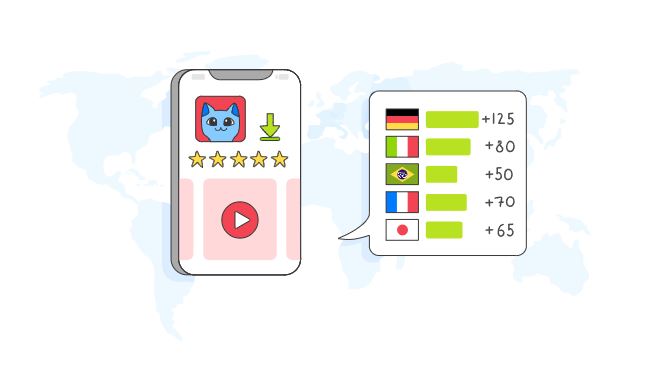
Mobile game and app companies are continually seeking ways to expand their audience base. While it’s common knowledge that localizing your app store page is essential for boosting downloads, localizing your app content will also have a significant impact on retention.
Drawing on our 20+ years of experience in app localization, we want to share our tips and best practices, which should be helpful for both experienced professionals in app & game localization and those who have yet to develop a solid localization strategy.
Here are the topics we will cover:
-
Most profitable languages for app & game localization
-
Typical localization mistakes
-
What tools to choose for a smarter localization process
-
Examples of how mobile app localization boosts its success
The original version of this article was based on data from 2020. This updated edition reflects the most recent data available as of February 2026.
Which localization languages are the most profitable?
First, we should note that this depends on the type of game/app you’re developing. Put simply, specific genres of games and apps are more popular in certain regions, and this definitely requires some competitor research.
As a rule of thumb, companies choose one of the following strategies:
-
Go for Tier 1 countries
-
Expand this range of regions and try less popular areas with less competition.
The 2nd approach was very successful for one of our clients, Wachanga — an ecosystem of mobile apps. They have translated their apps into over 50 languages, which has yielded fruitful results: they have generated a significant amount of revenue from less competitive regions, such as those outside the US, UK, or Germany.
In 2025, the landscape of localization demand has shifted noticeably. According to Alconost’s in-house data, French now leads the ranking with 7.6%, followed by German at 6.0%. Japanese has climbed into the Top 3 for the first time with 5.9%, while Simplified Chinese takes 4th place at 5.8% — its highest position in the past five years.
The middle of the list includes Spanish (Spain) and Italian, both at 5.6%, and Brazilian Portuguese at 5.5%, reflecting a slight decline in demand compared to earlier years. Korean, once higher on the list, has dropped to 8th with 5.5% after a period of fluctuations.
Rounding out the Top 10 are Dutch (3.8%) and Turkish (3.7%), both showing steady growth. Together, these ten languages account for more than half of all localization activity, while the “Other languages” category makes up the remaining 45%.
Volunteer translators vs. freelancers vs. localization companies — who should we choose?
When mobile app companies seek a time- and cost-effective localization solution, they typically choose between using volunteer translators, freelance translators, or localization companies.
We haven’t included machine translation in this list, as machine translation is not reliable enough to produce a quality translation for the end-user. Sometimes professional translators even refuse to edit machine-translated text because it may be incomprehensible, and also because it’s easier to translate the text from scratch rather than rework and edit machine translations. In most cases, using machine translations is risky and can’t be recommended.
Volunteer translators (including community translations). An obvious benefit is the cost. You can get these translations for free/at a low price, but that comes with its own challenges:
-
You may have to wait for a long time until the translation is finished (there are no set-in-stone deadlines).
-
There may be many mistakes, as volunteer translators are often individuals with little or no experience in localization, let alone game localization specifically. They can be individuals who simply want to gain knowledge and start a career in the localization industry, using your project as a means to get started, which is beneficial for them, but may not be ideal for you.
-
Complicated management: you have to contact each translator every time you have new content for translation, the deadline is approaching, you need to pay them, etc. That’s a lot of manual work. Additionally, using a large Google spreadsheet to store the translations increases the chances of accidental mistakes.
In this article, we examined the localization process of Goat Simulator, a well-known game developed by Coffee Stain Studios, which utilized community translation but encountered some challenges along the way.
It is better to use localization platforms, which we’ll discuss below. Working on localization platforms definitely makes life easier, but generally, it’s quite a hassle to work with volunteer translators or community translators.
Freelance translators are often more professional, experienced, and typically native speakers. Their translation services are relatively affordable, but again, that involves a lot of manual work: just imagine all the back-and-forth communication already described in the section about volunteer translators.
This process goes more smoothly if you use a localization platform; however, you bear a lot of responsibility and micromanagement, which can be a headache. There may be problems with consistency if your localization process is not fine-tuned, if you don’t use glossaries, and so on.
Localization companies involve less management and manual work, guarantee consistency, and use professional tools.
Many companies turn to localization agencies like Alconost because they want to avoid the micromanagement and headaches associated with building a localization process from scratch.
Localization companies bear the responsibility for the quality of the translations, for the management of translators, and essentially free you of the burden of manual work. You just need to send your files to the project manager and get them back with the translations. Occasionally, the project manager may come to you with questions from the translators, but this is usually not time-consuming and can be conveniently addressed through a localization platform.
No matter whether you work with freelance translators or localization companies, it is essential that translators you turn to are native speakers of the target language: that is, if you need a translation from English to Japanese, the translator should be a native speaker of Japanese and have a near-native level of fluency in English.
Some companies may hire non-native translators, which may result in translations that don’t flow naturally. The best practice is to use native speakers exclusively.
Localization tools that help reduce manual work
We’ve already mentioned localization platforms, but what are they? Some of the most popular platforms include Crowdin, Lokalise, SmartCat, POEditor, Phrase, and Transifex, among others. There are many more to choose from.
If you expect frequent updates, compare localization platforms by integrations, QA, automation, hosting, and migration risk before standardizing your workflow.
The advantages of using localization platforms:
-
Support for a wide variety of file formats (Crowdin supports 70+ to 100+ file formats)
-
Easy management and tracking of issues
-
Glossary to help keep the translation consistent
-
Use of TMs (translation memories) to reduce costs
You can also set things up so that new content is uploaded and retrieved automatically through an API. With localization platforms, it’s easy to manage this process, check and solve any issues, and track the progress.
It’s nice to know that translators basically don’t have a chance to mess up the code, because when your file is uploaded to a localization platform, the content is separated from the code, so translators only see the text for translation.
There are also automatic QA systems, so if figures or links are present in the source text and a translator accidentally removes them, the system will flag that the original figure/link is missing.
These days, ChatGPT and other AI-powered assistants can help translators and project managers with this workflow by producing context explanations, drafting alternative phrasings, or rapidly modifying marketing copy before a professional reviews it.
In contrast to unprocessed machine translation, these AI tools work more effectively when combined with human knowledge to reduce repetitive tasks, accelerate the process of generating culturally appropriate wording, and produce draft text for advertisements or app store descriptions that native speakers can refine. This hybrid strategy reduces expenses and turnaround times without sacrificing quality.
Lightweight self-service platform Nitro for short and quick translations
Sometimes, you have relatively short translations, and you probably don’t feel like contacting a project manager for a minor mobile app update or a small feature that needs to be translated into 20 languages.
Besides, if you turn to a localization company for a small translation task like this, you’re likely to be charged a minimum order fee for each language, making it pricey.
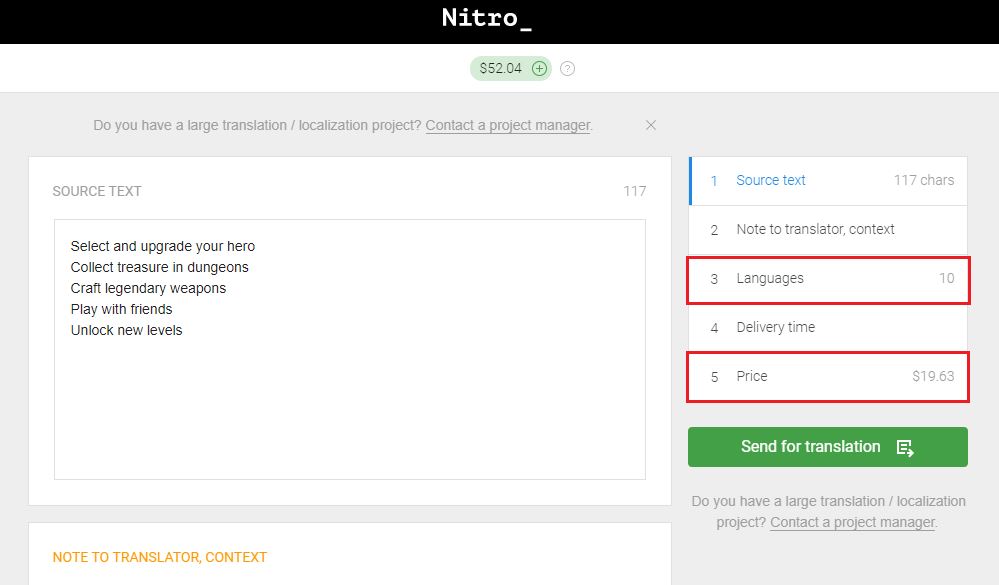
For cases like this, you can utilize our human translation platform, Nitro, which employs a process that differs from standard localization platforms. Nitro is a self-service platform, which means you don’t need a project manager to send the text for translation and get it back. Take a quick look at Nitro in action:
You simply log in to the platform, paste your text, select the required languages, pay online, and receive your translations within 24 hours. This is one of the key benefits of Nitro: translations that are not only completed by native speakers but also done quickly.
There are over 60 languages available on the platform, and placing an order is very easy and fast. There is no back-and-forth communication, and you can even provide context for your order as shown in the screenshot below.
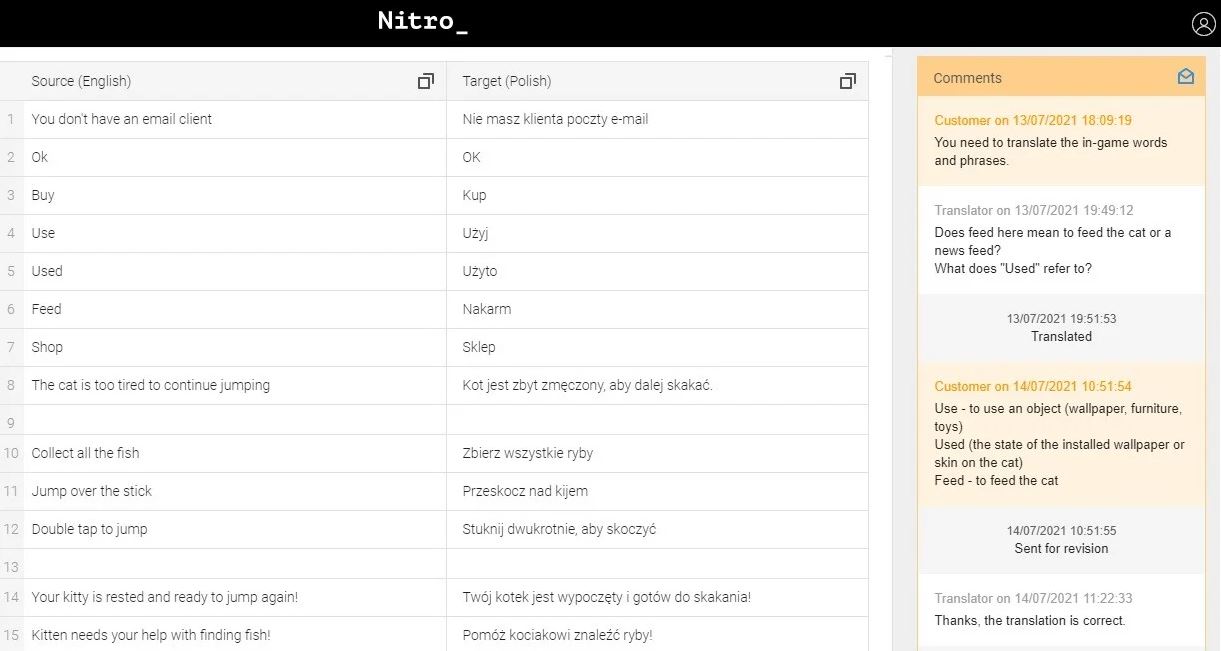
Nitro is a convenient platform if you need to translate something quickly and the text is relatively short, such as app store descriptions.
Typical localization mistakes you want to avoid
Now let’s take a look at some typical localization mistakes you may encounter — these issues crop up for experienced and inexperienced users of localization. We are all in the same boat!
Interfaces that are not scalable
Length of text strings frequently becomes a problem, especially in mobile apps and games. English is the most compact of European languages, so when English text is translated into Spanish/German/Russian/French, the words may become 20-25% longer than their English counterparts, and no longer fit into the interface.
To avoid this problem, you can design the interfaces to be scalable. In the screenshot below, you can see that the Russian words are longer. This particular game was translated from Chinese into English and other languages, and you can clearly see how much shorter and more compact the original Chinese text is.
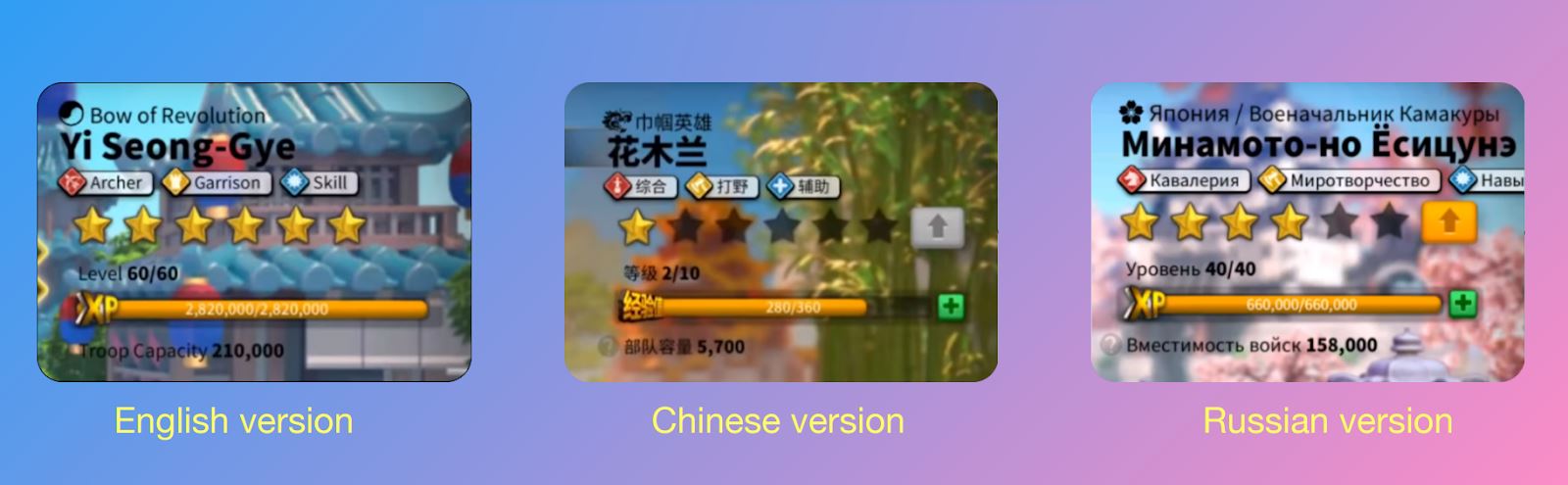
One additional option is to run a so-called pseudo-localization, which involves machine translation into one of your target languages, such as German, a language with very long words. By creating the machine translation into German, you can get an idea of how long the strings may be and what your scalable interfaces should look like.
Tricky fonts for RTL (right-to-left) languages and Asian fonts
RTL languages are languages such as Hebrew and Arabic. As the name suggests, the words are written from right to left, which may pose challenges with the interface layout. These languages also require special fonts, adding an extra layer of complications.
Here is what may happen when the wrong font is used. The developers accidentally applied the incorrect font, and some Japanese characters got replaced with Chinese characters (highlighted in the screenshot). As a result, the app was rejected by the Google Play team.
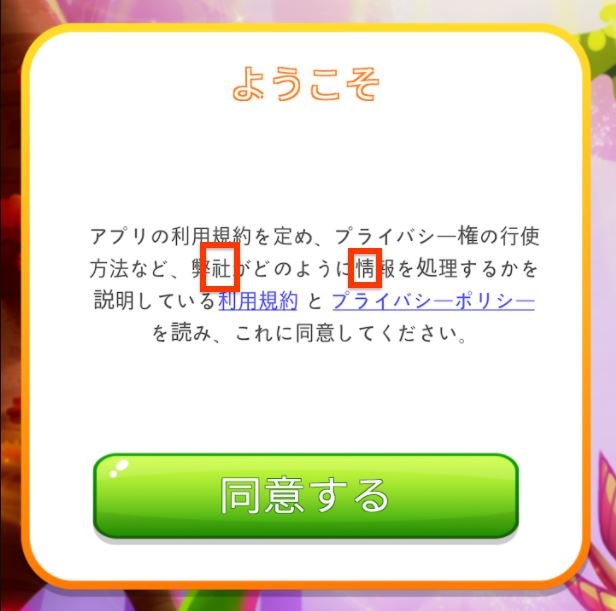
This screenshot was provided by one of our clients when they complained about the translation being rejected. Fortunately, our translators have extensive experience in mobile app localization, and they immediately suspected that the problem was with the incorrect font, which proved to be the case.
This is something to pay attention to; otherwise, the characters may be displayed incorrectly.
Localization includes adaptation
Not everyone realizes that localization encompasses more than just translation. Localization also includes adaptation of some things we don’t often think about:
-
dates (compare the US format 03/11/2022 vs. 11/03/2022 in Europe)
-
time (5:30 pm in the US vs. 17:30 in Europe)
-
measurements of weight and distance (think miles vs. kilometers, pounds vs. kilograms)
-
and even the way discounts work!
Sometimes, clients order a translation into Chinese that might contain a phrase like '20% discount,' and they believe something is wrong with the translation because it says '8折' instead of '20%'. “These numbers look wrong! There must be a problem!”
However, in Chinese, discounts have a different logic behind them: 8折 means “you pay 80% of the original price” — that is, 20% off. An accurate localization of a tricky translation.
Getting the context wrong
Context is the biggest challenge for developers just getting started with localization. People think that if you give a list of words and phrases to the translator, it is enough, because translators speak the language.
However, this is not how it works. Imagine you have only a list of words and no explanations whatsoever. Let’s take the word “block” for example (to block? An apartment block? A toy block? A street block?). With so many options to choose from, and without an explanatory comment or a screenshot of this item, the translator will have to take a wild guess.
Sometimes it’s essential to know if the character is male or female, as this influences the form the word takes in languages such as French, Spanish, and Portuguese.
In the example below, the context was “Day 0/30”, but the client decided they didn’t need to translate the “0/30” part, as it is the same in other languages. The word 'day' was translated out of context, and the client simply inserted it into the text.
The problem here is the word 'position' in Japanese and Korean, which differs from its English equivalent. The translation was rejected by the Google Play team just because of this mistake. Fortunately, the mistake could be quickly corrected, and the update was finally approved.

App marketing: ASO & UA activities at scale
UA campaigns and working with ASO are key elements of promoting your mobile app. We have a great article with tips for multilingual ASO, but for now, let’s have a quick recap of what ASO is.
Multilingual ASO
ASO (App Store Optimization) involves optimizing titles, subtitles, keywords, descriptions, screenshots, icons, and videos. With a global launch, these should all be localized.
Keywords are essential and require specialized research, often with the help of ASO tools, as it’s not enough to simply translate them from English. There are many ASO tools available now, such as App Radar, ASOdesk, and AppFollow, among others.
Description: Some developers only translate the first couple of sentences if they are on a tight budget.
Even more important than translating the app store descriptions is translating the text on the screenshots. This is a simple, cost-effective, and quick process that can be completed through an online translation platform like Nitro, which provides a straightforward order placement and turnaround process.
Ads in other languages
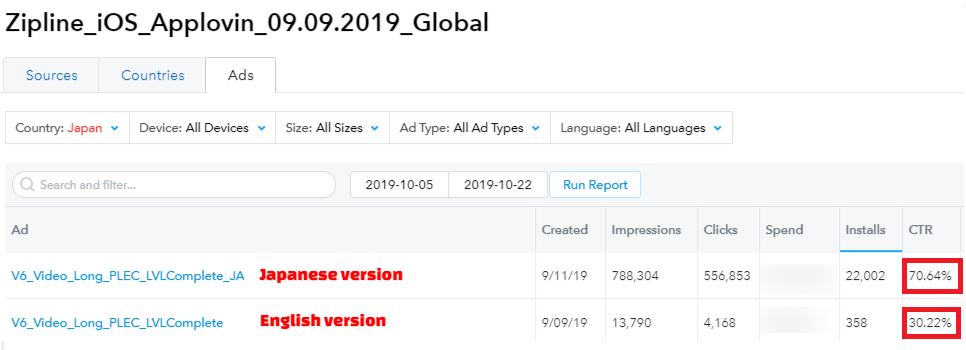
With an eye on UA activities, we’d like to provide an example of our client, Narcade, a Turkish mobile game development company. They had a promo video of their mobile game in English, and they simply translated the captions in the video into Japanese through Nitro.
Here is what they said about that campaign:
“The result was incredible. The Japanese creative got a 70% CTR (click ratio), while the English one got a 30% CTR, and we were able to get many more installs thanks to the creative in the Japanese language.”
Some game publishers that run numerous Google ads in other languages also use Nitro to optimize their workflow. As a publisher, they launch multiple campaigns every week, so it would be time-consuming for them to place these orders on Nitro every time they had a new Google Ads campaign. They utilize the Nitro API, which enables them to send orders to Nitro and receive translations automatically without needing to log into the platform. A nice feature is that they can also set a character limit to meet Google Ads requirements.
For Google Ad text, there tends to be just one string that needs to be translated into 10 languages. Getting all of this work done manually would be a massive hassle, as there is an impressive amount of these ads. Thanks to the Nitro API, the majority of this work can be automated, thereby saving you time and effort.
These tips will help you with your global strategy and optimize your marketing localization activities.
Learn more about marketing localization for mobile apps!
Related articles
Understanding Translation of JSON files
Apps localization
Game Localization
Nitro
8 minutes read
Finland for Game Devs: A Little Country with Big Possibilities
Game Localization
Global Markets
Nitro
8 minutes read
Popular articles
Understanding Machine Translation and Post-Editing: 4 Common Questions
Machine Translation
7 minutes read
Best localization and translation platforms comparison
Apps localization
Nitro
12 minutes read
The Most Popular Languages for Localization in 2021: An Overview from Alconost
Apps localization
Global Markets
14 minutes read
Latest articles
No Playbook, No Problem: What Happens When You Trust Your Team with Something New
Game Localization
Success stories
4 minutes read
AI or Human Translation: Which One Fits Your Project Best?
Machine Translation
4 minutes read
Alconost Releases an Advanced Approach to Game Localization, Helping Developers Save up to 30% on Costs
Game Localization
5 minutes read
Have a project in mind?
We’d like to learn more about it. In return, we’ll get back to you with a solution and a quote.